Road to Making My Own Terminal
Getting started
I’ve been living a pretty ADHD-shaped life lately. In one tab I’ve told Claude to do something, in another tab something else, five or six worktrees deep in the same project all running in parallel — and meanwhile I’m in meetings and checking issues coming in over Slack.
Working like this, I kept losing track of what had finished. I’d leave an agent idle for a while, or assume something was chugging along nicely only to discover an hour later that it had stopped three minutes in, waiting for me to make a decision. And since I run my own work through Claude but hand the review of Claude’s plans and code to Codex — which I never open directly — the only way I’d learn I’d hit a usage limit was when Claude told me its “review failed.”
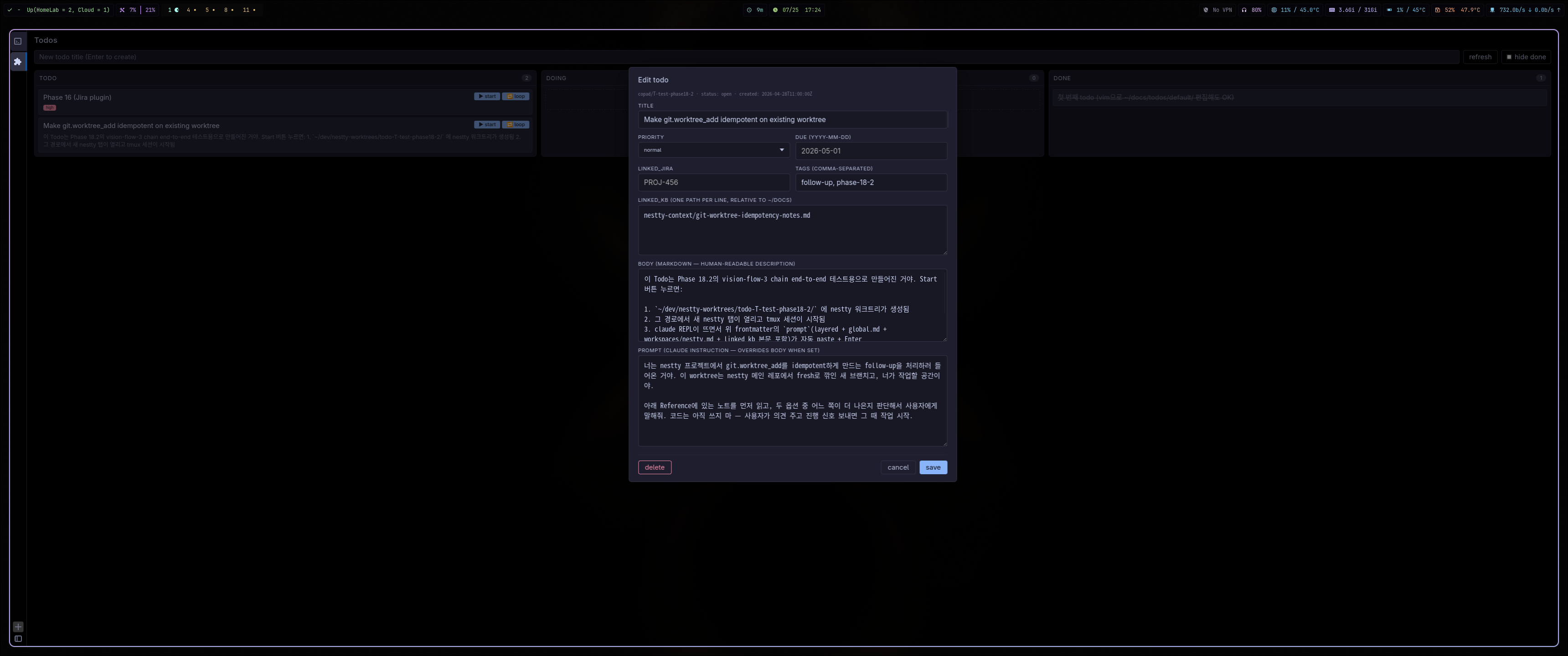
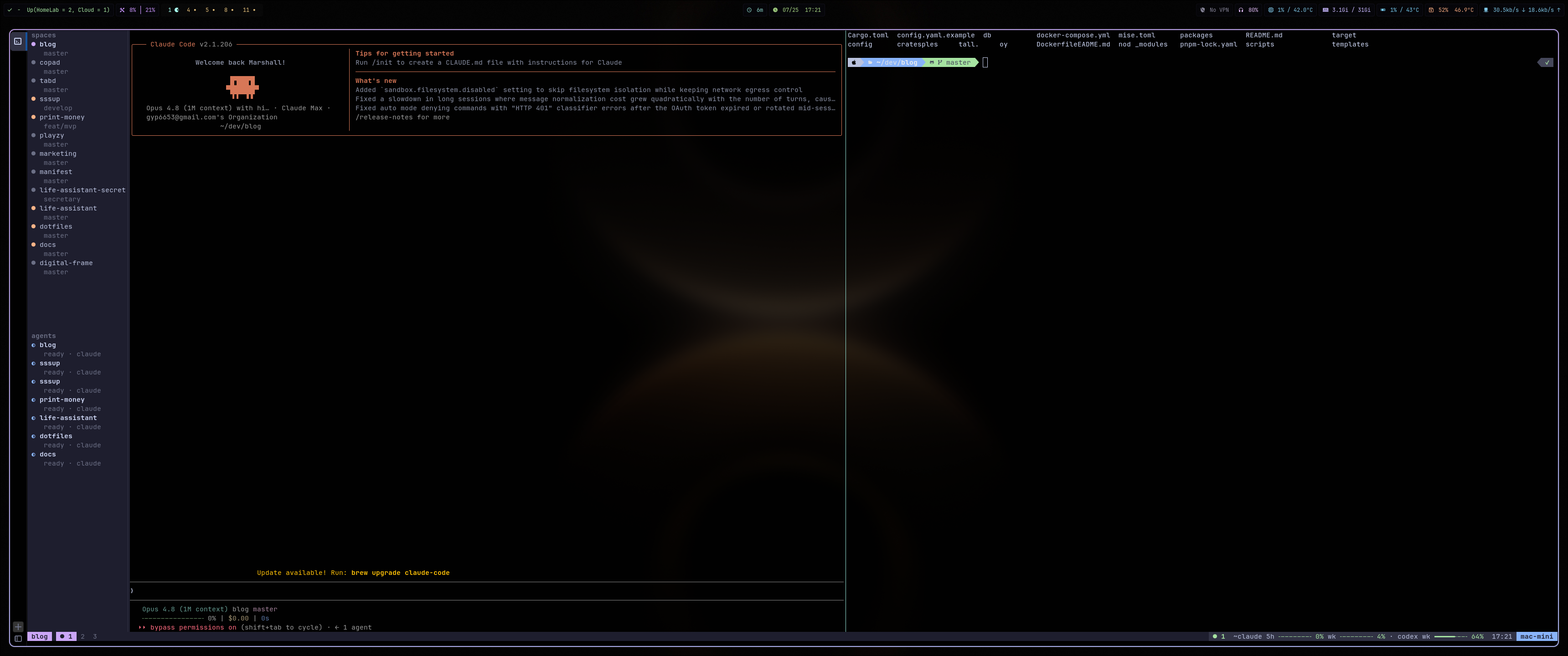
To fix this I built two things: Copad, a terminal, and Comux, a terminal multiplexer. Copad bundles things like todo management, a knowledge-base integration, and Slack so you can get a lot done without leaving the terminal — you can stash the context for a task in a todo and kick Claude off with a single button. Comux is a multiplexer deeply integrated with agents: alongside the usual pane splits, the left side shows your session list and each agent’s status, a notification center collects the alerts agents have recently sent, and the bottom status bar shows live Claude/Codex usage.
The code is on GitHub , and you can install it with the commands below or from the Installation guide.
curl -fsSL https://raw.githubusercontent.com/marshallku/copad/master/install.sh | bash

# or, to build from source
./scripts/install-dev.sh   # Linux
./scripts/install-macos.sh # macOS
Why I started
I’d been bouncing between ghostty, kitty, and foot, never quite settling because each had something that bugged me. kitty burned CPU rendering background images; ghostty couldn’t drive a single terminal over a bus; and once I opened several tabs on macOS (which I have to use to pay the bills…) they fought with aerospace, shrinking the window every time a new tab appeared. On top of that, now that I basically live in the terminal — I’ve dropped Cursor and moved to NeoVim — both of those terminals are faithful just to being a “terminal,” and none of them let me pull in the tools I actually work with.
So it started as something light: build a terminal that patches up the small annoyances in kitty and ghostty. I knew ghostty renders on the GPU and that doing that well is hard, but honestly I’d never really felt the performance sting of a CPU-rendered terminal, so I figured I’d just bolt on the few things I needed and be done quickly.
Building Custerm
So I built the first version on Linux with GTK4 and VTE. From there I added an event bus so everything could be driven programmatically — you could control a single terminal at a time, and the terminal could receive an event when a given task started or finished.
The first plugin: a browser
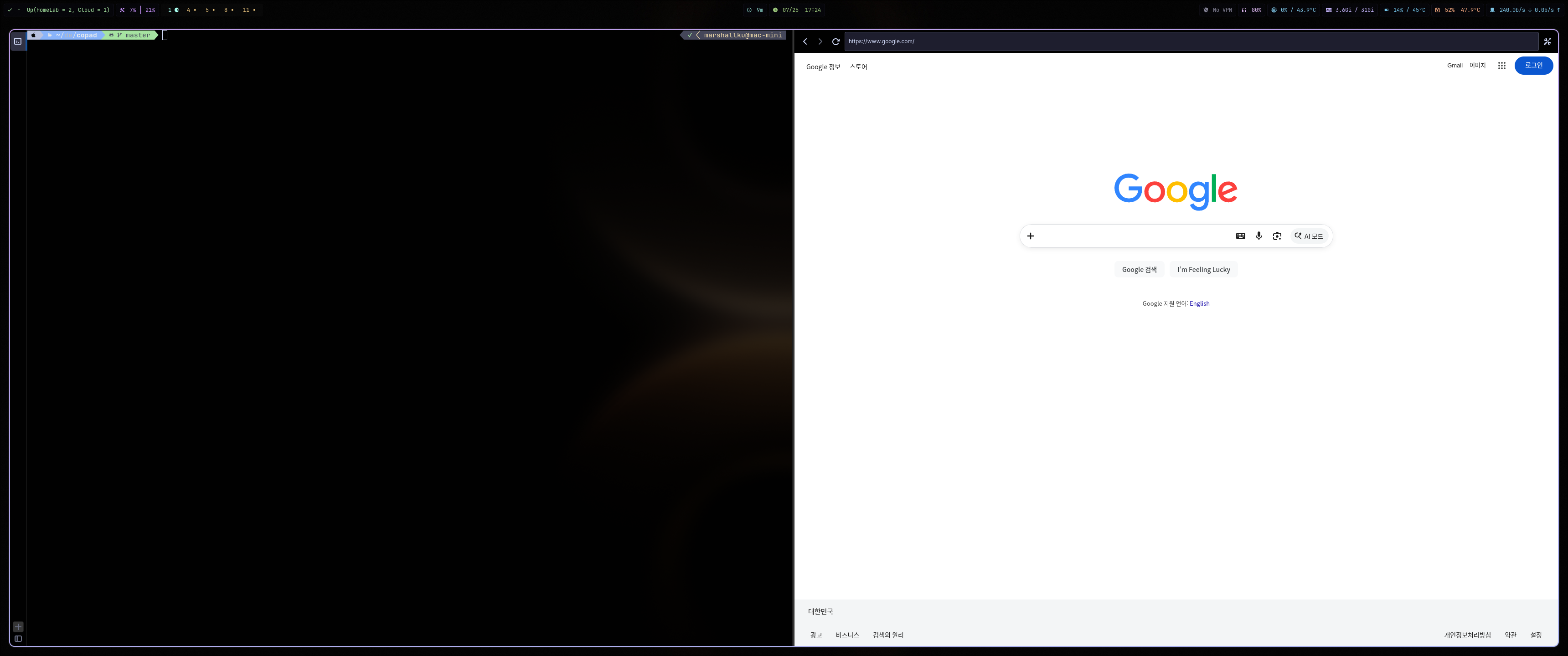
There are things like “Claude in Chrome” now, but at the time I built this there was no real standard for driving a GUI browser from Claude. So I started baking a plugin concept into the terminal and ported in a browser you can script over the CLI — run JavaScript, do network debugging, and so on. From then on I could fold end-to-end validation by Claude into any web-facing work.
Debugging a nasty WebKit freeze
This is where I hit my first wall. I use Arch Linux for personal work, and moving between workspaces would freeze the browser on its last frame. The backend, the process, the IPC — all clearly alive, but no matter what I did it wouldn’t repaint.
I tuned environment variables, tested on a laptop in case it was an NVIDIA GPU
issue, poked at the Wayland protocol
sending various signals — burning a mountain of tokens debugging — and still
couldn’t fix it. On dual monitors it would recover if I forced a resize via
hyprctl (and it had to be chained with &&, not joined with ;), so I sat
there wondering whether I’d just have to live like this:
# settings I added to the config file to keep WebKit alive.
# being able to define a trigger like this is one of Copad's features, too.
[[triggers]]
name = "hyprland-webkit-cure"
action = "system.spawn"

[triggers.when]
event_kind = "window.restored"

[triggers.security]
allow_privileged = true

[triggers.params]
argv = ["sh", "-c",
    "hyprctl dispatch resizewindowpixel '1 0,class:com.marshall.copad' && hyprctl dispatch -- resizewindowpixel '-1 0,class:com.marshall.copad'"]
I’d used WebKit instead of Chromium to keep the browser lightweight, and since this looked like a WebKit-only bug I even considered burning all my tokens porting Chromium in — but there’s no easy library for that on Arch and the port is fairly hard, so I was mildly despairing. In the end I debugged it far enough to open an issue on Hyprland — and, a little sheepishly, it turned out to be a GTK bug instead. It was the first time I ever found myself desperately waiting on a Hyprland update. A little more pain and the project might have folded, so I count myself lucky.
And then, a nasty image-rendering problem
On Linux, switching the background image would lag stdin/stdout by about a second each time. It turned out VTE runs its PTY read/write loop on the same thread as rendering — macOS splits those across threads, but on Linux it’s synchronous, so decoding a big image could stall the PTY for over a second.
// background.rs:70 — state
load_generation: Cell<u64>,             // bump per switch; drop stale decodes
decoding: Cell<bool>,                   // at most 1 in-flight
pending: RefCell<Option<(PathBuf, bool)>>,  // latest-wins queue
mounted: RefCell<Option<(PathBuf, bool)>>,  // rollback target on failure

// background.rs:174 — request: coalesce + generation bump
self.load_generation.set(self.load_generation.get() + 1);
if self.decoding.get() {
    *self.pending.borrow_mut() = Some((path.to_path_buf(), from_list));
    return;
}
self.spawn_decode(path.to_path_buf(), from_list);

// background.rs:202 — off-main (only Send bytes cross the boundary)
let generation = self.load_generation.get();
glib::spawn_future_local(async move {
    let result = gtk4::gio::spawn_blocking(move || decode_image(&decode_path)).await;
    layer.on_decode_complete(generation, path, from_list, decoded);
});

// background.rs:225 — done: stale-drop + rollback on failure + drain pending
if generation == self.load_generation.get() {
    match decoded {
        Ok(image) => { self.mount_texture(image); *self.mounted.borrow_mut() = Some((path, from_list)); }
        Err(e) => { let mounted = self.mounted.borrow().clone();  // roll current → mounted
                    self.has_image.set(mounted.is_some()); *self.current.borrow_mut() = mounted; }
    }
}
This one was relatively simple to fix: move decoding onto another thread with
gio::spawn_blocking, plus a generation counter so a slow decode that lands after
you’ve already switched away just gets thrown out.
Porting to macOS
It’d be nice if I could just use Linux and be done, but life isn’t that generous — the company macbook is a fixed constant, so through tears I started porting to macOS. Since I’d moved my own MacBook over to Arch and sold everything off, I had to work on a not-so-powerful M1.
This is where things got genuinely hard: I had to port the terminal logic I’d written on Linux over to macOS and cover the little per-platform differences. And the fact that Linux has VTE4 — a stable, finished terminal engine — while macOS has nothing of the sort was a big hurdle. I write a much smaller share of the code these days, so compared to the old days it’s practically leisurely, but native apps need careful testing, and hopping from one platform to continue on another is tricky in a lot of ways.
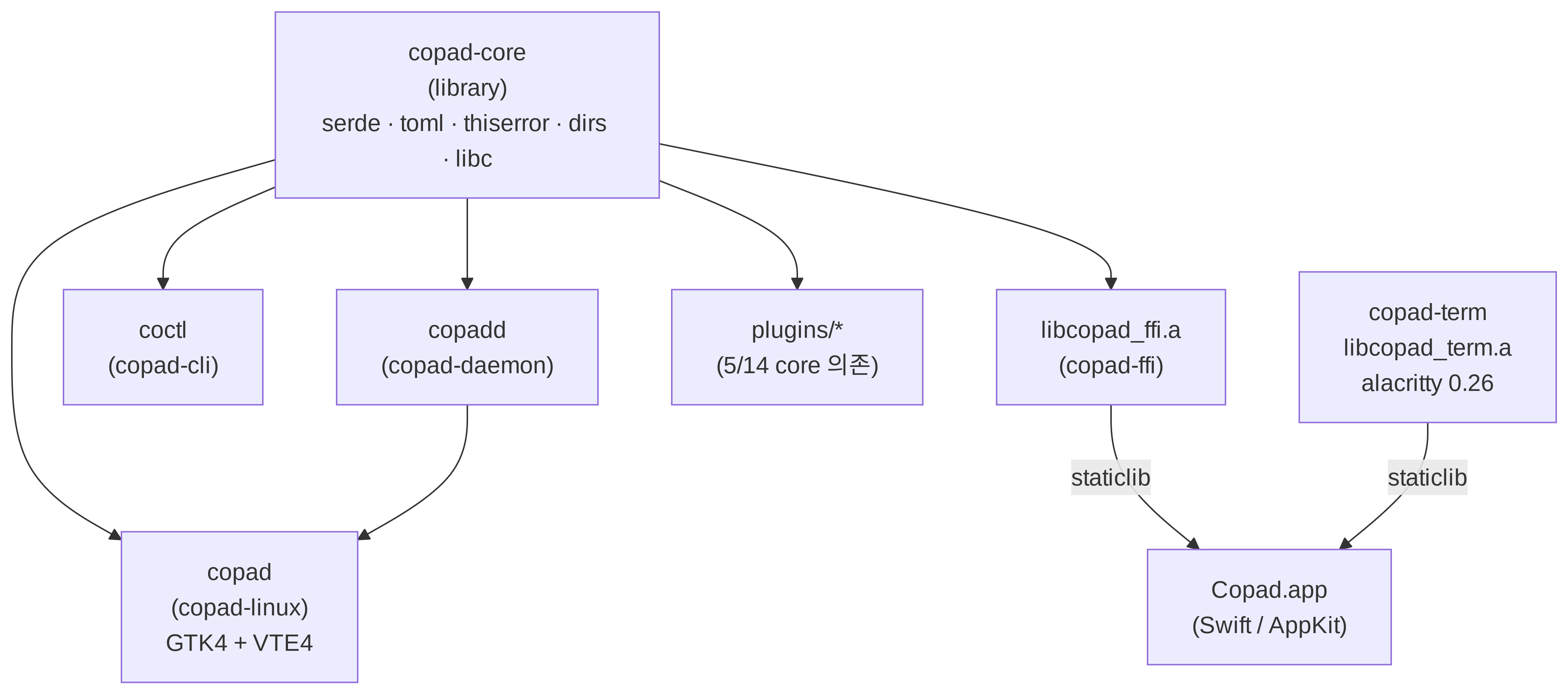
At a high level Copad ended up structured like the diagram above. I built coctl to drive copad from the CLI and copadd to run various jobs from a daemon. The shared skeleton — copad-core, the CLI, the daemon — is Rust, and the UI is Rust on Linux and Swift on macOS.
As I said, the decisive difference really comes down to whether a terminal widget exists, so here’s a summary of how the two diverge:
| Linux | macOS | |
| Engine | VTE4 | alacritty_terminal — only a parser and grid state machine |
| PTY | VTE’s built-in spawn_async | managed by the copad-term crate, exposed over FFI |
| Rendering | VTE handles it | direct rendering via a Metal glyph atlas, CoreText fallback |
| Shell | GTK4 | AppKit |
| Web view | WebKitGTK 6.0 | WKWebView (a friend I hadn’t seen in a while) |
| Splitting | gtk4::Paned (binary tree) | NSSplitView + EqualSplitView (N-ary SplitNode) |
| Notifications | libnotify | osascript |
Looking back, none of it was easy. I started out taking the easy path with SwiftTerm, but dropped it for these reasons:
- IME composition breaks. There’s a moment writing Korean on Linux or macOS where being Korean makes you a little sad — handling composed characters is apparently not a simple thing.
- With a background image set, the cursor becomes invisible.
- SGR 7 (
ESC[7m) is basically the standard for marking a “selected item” in a TUI, and with a background image it doesn’t render right. - SwiftTerm draws the caret in a monolithic
drawRect, which makes keeping the caret visible over an image hard.
So I weighed forking SwiftTerm, using the alacritty_terminal crate and writing
my own renderer, waiting for libghostty to ship, or building from scratch — and
went with alacritty_terminal. Forking SwiftTerm meant fixing every one of those
issues and rebasing forever; waiting for libghostty wasn’t an option because Copad
was too fun and I wanted to move fast; and starting from zero would take too long.
alacritty_terminal isn’t built for external use, but I accepted the risk and used
it anyway. Given the pile of issues I ran into building the Metal GPU renderer, I
still think it was a pretty good call.
Building comux
Why
Honestly, just having a terminal that met my needs already had me living pretty happily — but a couple of problems eventually surfaced.
First, a tool like the knowledge base ended up underused. I’d built these features thinking they’d be handy, but editing never beats NeoVim, and both accessibility and everyday usefulness are far higher when it’s a CLI.
Second, I do a fair amount of remote work. When I’m coding on an iPad during my commute, or SSHing into another personal dev machine, none of these tools do me any good. The macOS build is usable at work, but that alone was hard to call “fully optimized.” I even tried wiring my personal harness into coctl and copadd and auto-launching Copad on desktop boot to cut friction — but that wasn’t satisfying either. I’d made sessions and persistence drawing on my tmux experience, and yet I kept catching myself still using tmux, all because of remote access.
For these reasons I decided to build a multiplexer.
The UI took a lot of inspiration from herdr . The natural question — why not just use herdr instead of building my own — has a few answers:
- I was already getting a lot out of tmux’s status bar and its tab system, and I just didn’t want the UI or keybindings to change wholesale.
- I’d built a tool called tmx to optimize my tmux experience, and I wanted to keep that.
- I’d already implemented a lot of what herdr does inside copad, so the build cost wouldn’t be that high.
So I built comux, and I’m very happy with how it turned out. Creating sessions like
tmux, making tabs within a session, splitting panes — all built in, of course.
(I’ve honestly never split a pane, since I find jumping tabs with alt+$num faster
and more intuitive, so I’m not sure how much I’ll use it — but it’s a common feature
so I added it.)
Along the way I got to learn a lot about terminal rendering.
// state.rs:236 — owned by exactly one task
pub struct State {
    workspaces: Vec<Workspace>,
    terminals: HashMap<TerminalId, Terminal>,
    clients: HashMap<ClientId, Attach>,
    next_pane: u64, next_term: u64, next_tab: u64,
}

// state.rs:455 — the single entry point, serialized via &mut self
pub fn apply(&mut self, cmd: Command) -> Result<Vec<Event>, MuxError> {
    match cmd {
        Command::SplitPane { origin, workspace, pane, dir, if_rev } =>
            self.split(origin, workspace, pane, dir, if_rev),
        // ...
    }
}

// state.rs:784 — stale-rev guard + rev bump
if let Some(expected) = if_rev && expected != cur_rev {
    return Err(MuxError::StaleRev { current: cur_rev });
}
tab.rev += 1;
self.workspaces[idx].rev += 1;
A single State owns all of the mux’s mutable state, and I gave it exactly one
entry point for changes. With so many inputs to manage — deciding where and how
each gets handled — this shape fit best.
// proto.rs:24
pub struct WireCell {
    pub x: u16, pub y: u16, pub sym: String,
    pub fg: Color, pub bg: Color,
    pub mods: Modifier,        // ratatui Modifier bits (BOLD/DIM/REVERSED…)
    #[serde(default)] pub skip: bool,  // trailing half of a wide glyph — CJK/emoji break if not sent
}

// server.rs:636 — compose + per-client diff
let mut buf = Buffer::empty(area);
let cursor = app.render_to(&mut buf).map(|p| (p.x, p.y));
for c in clients.iter_mut() {
    let changed = c.last.diff(&buf);        // ratatui cell diff
    if changed.is_empty() && !c.needs_full && cursor == c.last_cursor { continue; }
    let cells: Vec<WireCell> = changed.iter().map(|(x, y, cell)| WireCell {
        x: *x, y: *y, sym: cell.symbol().to_string(),
        fg: cell.fg, bg: cell.bg, mods: cell.modifier, skip: cell.skip,
    }).collect();
On top of that server I also had to render the PTY output into an off-screen
ratatui Buffer and, per client, diff against the last-sent buffer to transmit
only the cells that changed. It was a great chance to learn how the terminal and
tmux I use every day actually work underneath — computing a correct diff for tools
with unusual rendering like Claude Code, or full-screen TUIs, took more effort than
I expected.
And the feature I’m proudest of: a restart survives the conversation. comux
autosaves your layout, and on restart it doesn’t just bring back empty shells — it
relaunches each agent mid-conversation, resuming the exact session the process was
in by reconstructing claude --resume <id> / codex resume <id>. Kill the server,
reboot the machine, come back — and your agents pick up right where they left off.
tmux-resurrect restores your shells; comux restores the actual chat.
Then I made a feature that tmux lacks — one I’d been scratching the itch for with
tmx — far more intuitive. The session list and agent list on the left mean that
what used to take a ctrl+b g in tmx to see in a dialog — which agent is doing
what — is now visible at a glance.
I also put live Claude and Codex usage along the bottom. The Codex review isn’t something I control directly, but monitoring usage should at least let me use it with a bit more awareness.
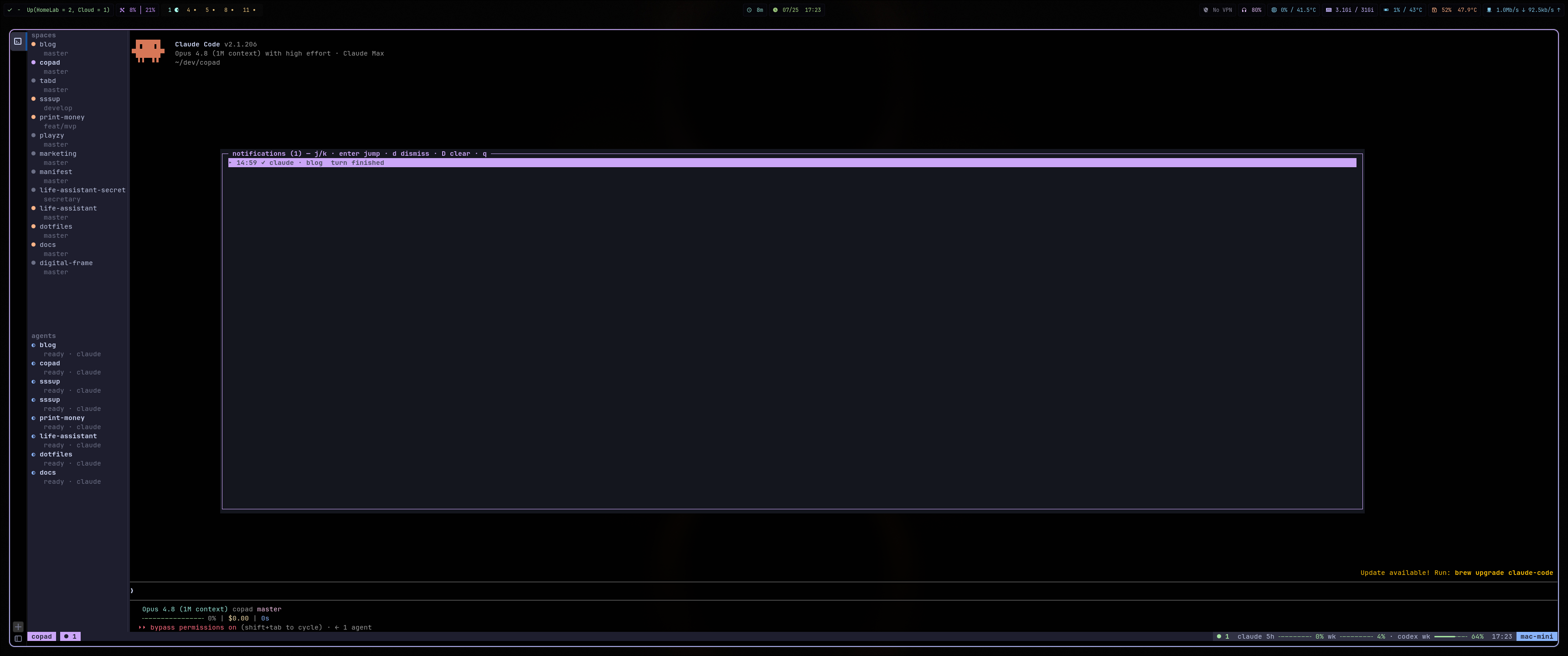
On top of that, agents stack up a notification when they finish a session or the like, and a shortcut lets me review them. It keeps me from losing track of what I should do next — though I’ve always prided myself on fast context switching, once five or six agents are running and the notifications pile up, it gets a little hard to keep up.
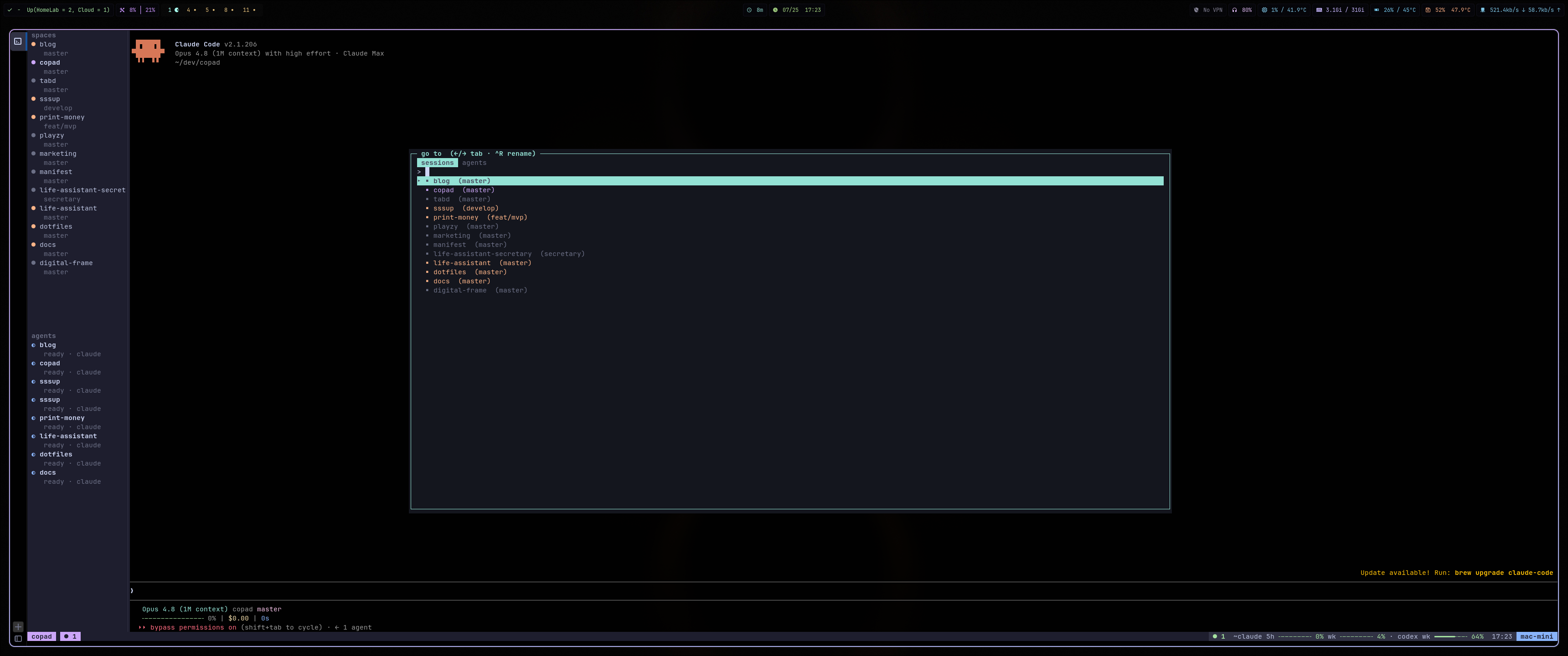
I also built in the dialog-style UI that tmx used to provide.
Building the mobile app
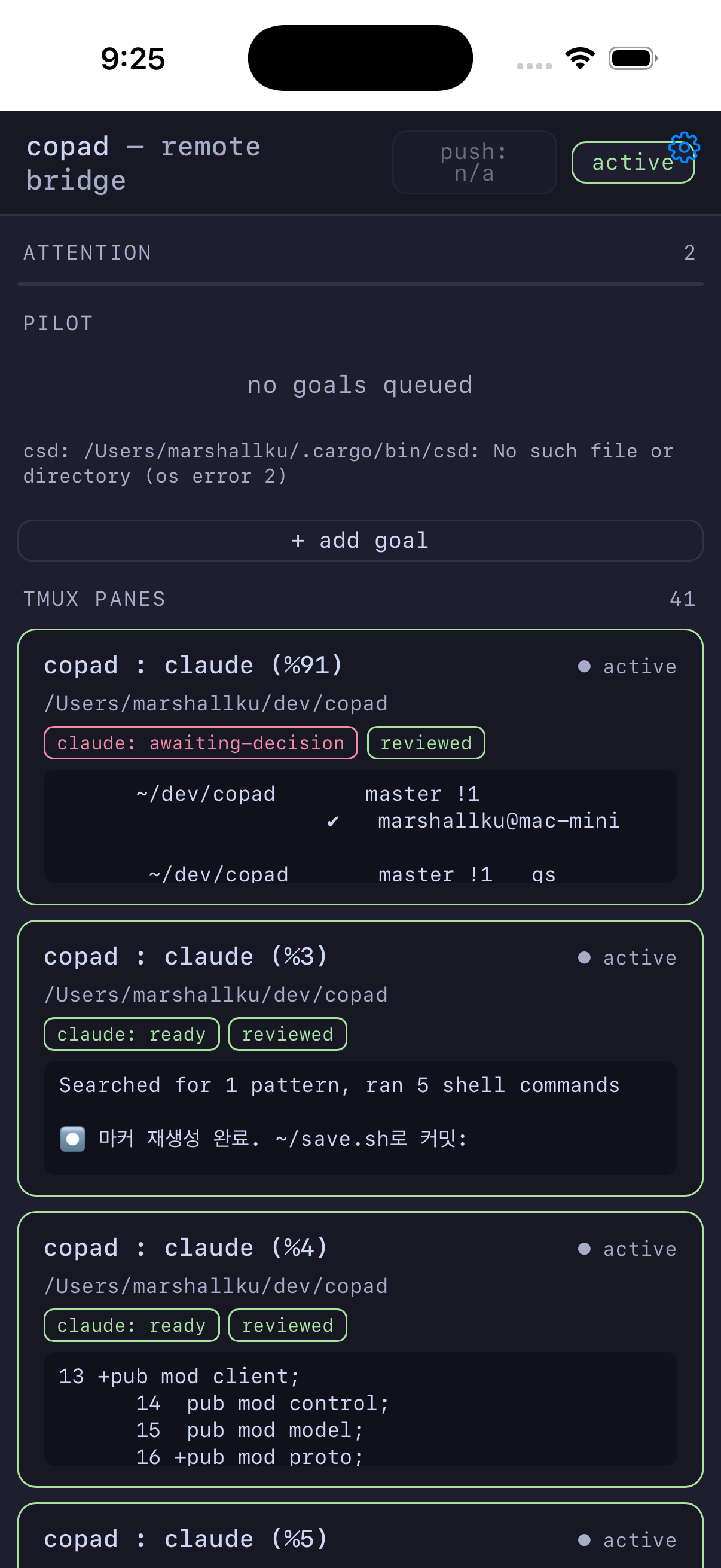
I started this after seeing orca ship an app, though I’m honestly a little worried about whether it offers anything beyond just connecting with Termius and bringing up comux. If anything the upside is push notifications, but the usefulness feels a bit ambiguous.
Still, to mark the start of paying Apple its yearly “friendship fee” (the developer account), I’ve been cranking out apps too.
Wrapping up
That’s a quick tour of the roughly four-month journey of building a terminal to optimize my own workflow. AI shrinking my thinking time makes me sad now and then, but seeing that in a mere four months you can build a multi-platform terminal (one that even renders on the GPU), a terminal multiplexer, and more — the dopamine, at least, has gotten a lot more varied.
I built this open-source from the start with other people in mind. As I laid out the structure, comux ended up depending a little on coctl (for agent usage), so I’m weighing options: releasing it as one set, or letting comux be installed on its own. I haven’t used tools like orca, herdr, or cmux, but as a long-time tmux user it feels like I’ve finally built something I could switch to completely, which is pretty exciting.
Since it’s a tool I use for work every single day, I figured it was already usable, so I shipped 1.0.0. I’m also working on things like clean installs from a bare environment and pulling comux out on its own, to keep making it a much more stable tool.
Loading comments…